---
title: Review your Hard Commitment
description: How to review your investment details after investing.
---
[Skip to content](https://help.tribevest.com/review-your-hard-commitment#main-content)
English
Show submenu for translations
[](https://tribevest.com/)
Open main navigation
Close main navigation
- English
Show submenu for translations
- Contact us
Contact us
How can we help you?
- There are no suggestions because the search field is empty.
1. [Knowledge Base](https://help.tribevest.com/?hsLang=en)
2. [Investor Support](https://help.tribevest.com/investor-support?hsLang=en)
3. [Trident (https://trident.tribevest.com)](https://help.tribevest.com/investor-support?hsLang=en#trident-https-trident-tribevest-com)
# Review your Hard Commitment
## How to review your investment after investing.
### Key Steps
**Step 1: Access the Offering** [0:00](https://loom.com/share/055bf996ed7f4ca4b63a1a94d31c09d9?t=0)
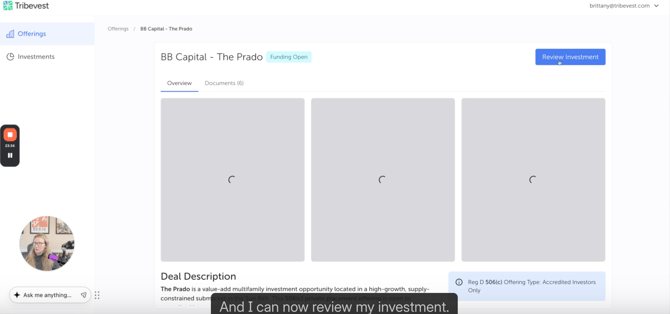
- Navigate to the offerings section of the platform.
- Locate and select the offering you invested in from the list of offerings.
**Step 2: Review Your Investment** [0:16](https://loom.com/share/055bf996ed7f4ca4b63a1a94d31c09d9?t=16)
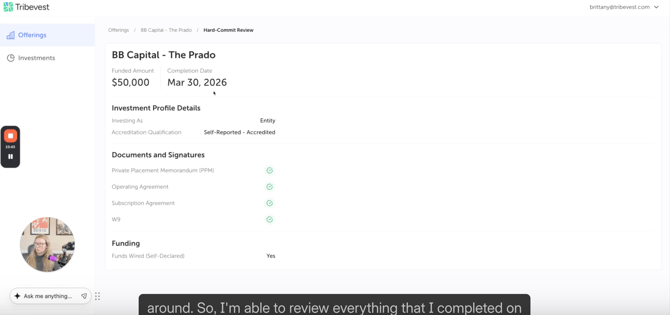
- Once in the Hard-Commit Review section, you can review all details related to your investment.
- Ensure that you check all completed actions on your end as an investor.
### Cautionary Notes
- Double-check that you are reviewing the correct investment to avoid confusion.
- Ensure that you have the necessary permissions to access investment details.
### Tips for Efficiency
- Familiarize yourself with the layout of the offerings section to speed up navigation.
- Keep a checklist of what to review for each investment to ensure nothing is overlooked.
### Link to Loom
[https://loom.com/share/055bf996ed7f4ca4b63a1a94d31c09d9](https://loom.com/share/055bf996ed7f4ca4b63a1a94d31c09d9)
- [About Tribevest](https://help.tribevest.com/about-tribevest?hsLang=en)
- [Security](https://help.tribevest.com/security?hsLang=en)
- [Self-Service Tribes](https://help.tribevest.com/self-service-tribes?hsLang=en)
- [For Independent Capital Aggregators](https://help.tribevest.com/for-independent-capital-aggregators?hsLang=en#main-content)
- [Trident (https://trident.tribevest.com)](https://help.tribevest.com/for-independent-capital-aggregators?hsLang=en#trident-https-trident-tribevest-com)
- [Investor Support](https://help.tribevest.com/investor-support?hsLang=en#main-content)
- [Tribevest Pro (https://pro.tribevest.com)](https://help.tribevest.com/investor-support?hsLang=en#tribevest-pro-https-pro-tribevest-com)
- [Trident (https://trident.tribevest.com)](https://help.tribevest.com/investor-support?hsLang=en#trident-https-trident-tribevest-com)
- [Money Movement](https://help.tribevest.com/money-movement?hsLang=en)
[](https://help.tribevest.com/?hsLang=en)
[mailto:email@email.com](mailto:email@email.com)
Copyright © 2026, Tribevest