---
title: How do I invest?
description: This SOP outlines the steps for an investor to successfully invest in a deal through the platform.
---
[Skip to content](https://help.tribevest.com/how-do-i-invest#main-content)
English
Show submenu for translations
[](https://tribevest.com/)
Open main navigation
Close main navigation
- English
Show submenu for translations
- Contact us
Contact us
How can we help you?
- There are no suggestions because the search field is empty.
1. [Knowledge Base](https://help.tribevest.com/?hsLang=en)
2. [Investor Support](https://help.tribevest.com/investor-support?hsLang=en)
3. [Trident (https://trident.tribevest.com)](https://help.tribevest.com/investor-support?hsLang=en#trident-https-trident-tribevest-com)
# How do I invest?
## This article outlines the steps for an investor to successfully invest in a deal through the platform.
**Step 1: Access the Offering Page** [0:08](https://loom.com/share/3ec3a5177a6c44e1ab3babe4e1c5be15?t=8)

- Go to https://trident.tribevest.com to login with the magic link.
- Navigate to the offering page.
- Click on the 'Invest' button to proceed with the investment.
**Step 2: Create Investment Profile** [0:25](https://loom.com/share/3ec3a5177a6c44e1ab3babe4e1c5be15?t=25)
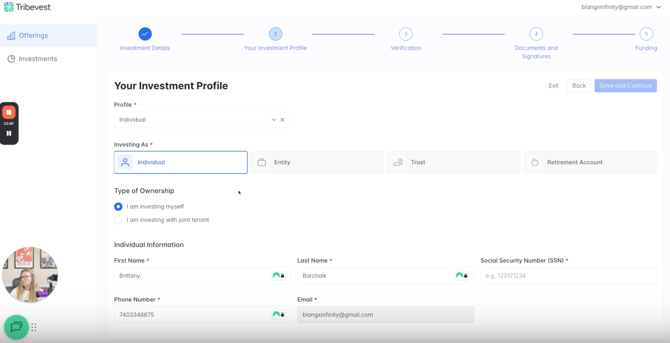
- Enter the investment amount (e.g., $50,000).
- Create a new investment profile if you are a new investor.
- Provide personal details such as social security number and address.
**Step 3: Accreditation Verification** [1:23](https://loom.com/share/3ec3a5177a6c44e1ab3babe4e1c5be15?t=83)

- Select your accreditation status (accredited or not).
- If you do not have your accreditation documents, you can skip this step and upload them later.
**Step 4: Review Documents** [2:03](https://loom.com/share/3ec3a5177a6c44e1ab3babe4e1c5be15?t=123)
[](https://loom.com/share/3ec3a5177a6c44e1ab3babe4e1c5be15?t=269)
- Download a copy of the completed offering documents for your records.
- Review the Private Placement Memorandum (PPM) and Operating Agreement (OA).
- Confirm that you have read and understood both documents.
**Step 5: Sign Subscription Agreement** [2:33](https://loom.com/share/3ec3a5177a6c44e1ab3babe4e1c5be15?t=153)

- Launch DocuSign to sign the subscription agreement.
- Fill in required details: investment method, certification, birthday, citizenship, and investment amount.
**Step 6: Complete W9 Form** [3:34](https://loom.com/share/3ec3a5177a6c44e1ab3babe4e1c5be15?t=214)
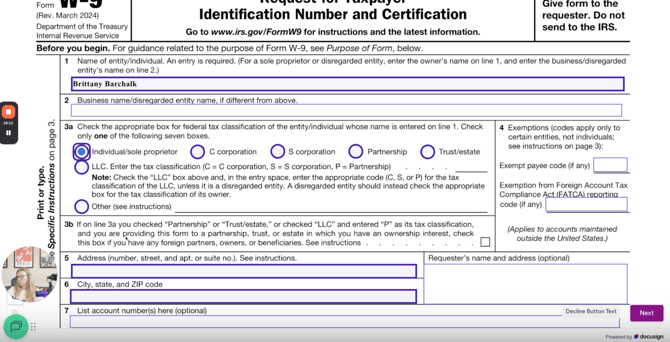
- Fill out and submit the W9 form.
**Step 7: Download Offering Documents** [4:29](https://loom.com/share/3ec3a5177a6c44e1ab3babe4e1c5be15?t=269)

- Download a copy of the completed offering documents for your records.
**Step 8: Funding Instructions** [4:48](https://loom.com/share/3ec3a5177a6c44e1ab3babe4e1c5be15?t=288)

- Review the wiring instructions provided on the screen.
- Download the PDF or take a screenshot for reference.
- Confirm that you will wire the funds as directed.
- Click 'Save and Continue' to finalize the process.
**Step 10: Complete the Investment Process** [5:31](https://loom.com/share/3ec3a5177a6c44e1ab3babe4e1c5be15?t=331)

- Ensure that you wire the funds to the bank as instructed.
- Wait for the fund manager to counter-sign the documents via DocuSign.
### Cautionary Notes
- Ensure all personal information is accurate to avoid delays.
- Keep a copy of all documents for your records.
### Tips for Efficiency
- Use a secure internet connection when entering sensitive information.
- Review all documents thoroughly before signing to avoid any misunderstandings.
- [About Tribevest](https://help.tribevest.com/about-tribevest?hsLang=en)
- [Security](https://help.tribevest.com/security?hsLang=en)
- [Self-Service Tribes](https://help.tribevest.com/self-service-tribes?hsLang=en)
- [For Independent Capital Aggregators](https://help.tribevest.com/for-independent-capital-aggregators?hsLang=en#main-content)
- [Trident (https://trident.tribevest.com)](https://help.tribevest.com/for-independent-capital-aggregators?hsLang=en#trident-https-trident-tribevest-com)
- [Investor Support](https://help.tribevest.com/investor-support?hsLang=en#main-content)
- [Tribevest Pro (https://pro.tribevest.com)](https://help.tribevest.com/investor-support?hsLang=en#tribevest-pro-https-pro-tribevest-com)
- [Trident (https://trident.tribevest.com)](https://help.tribevest.com/investor-support?hsLang=en#trident-https-trident-tribevest-com)
- [Money Movement](https://help.tribevest.com/money-movement?hsLang=en)
[](https://help.tribevest.com/?hsLang=en)
[mailto:email@email.com](mailto:email@email.com)
Copyright © 2026, Tribevest
```json
{
"@context" : "https://schema.org",
"@type" : "VideoObject",
"contentUrl" : "https://242741188.fs1.hubspotusercontent-na2.net/hubfs/242741188/video_assets/303429748442/inherited/web_optimized.mp4",
"dateModified" : "2026-01-26T14:42:45.028Z",
"duration" : "PT5M42S",
"height" : 1080,
"name" : "Investor View - Make an Investment via Tribevest",
"thumbnailUrl" : "https://242741188.fs1.hubspotusercontent-na2.net/hubfs/242741188/Investor%20View%20-%20Make%20an%20Investment%20via%20Tribevest.mp4/medium.jpg",
"uploadDate" : "2026-01-26T14:41:32.642Z",
"width" : 2096
}
```